Fixing Android FormData network errors in React Native
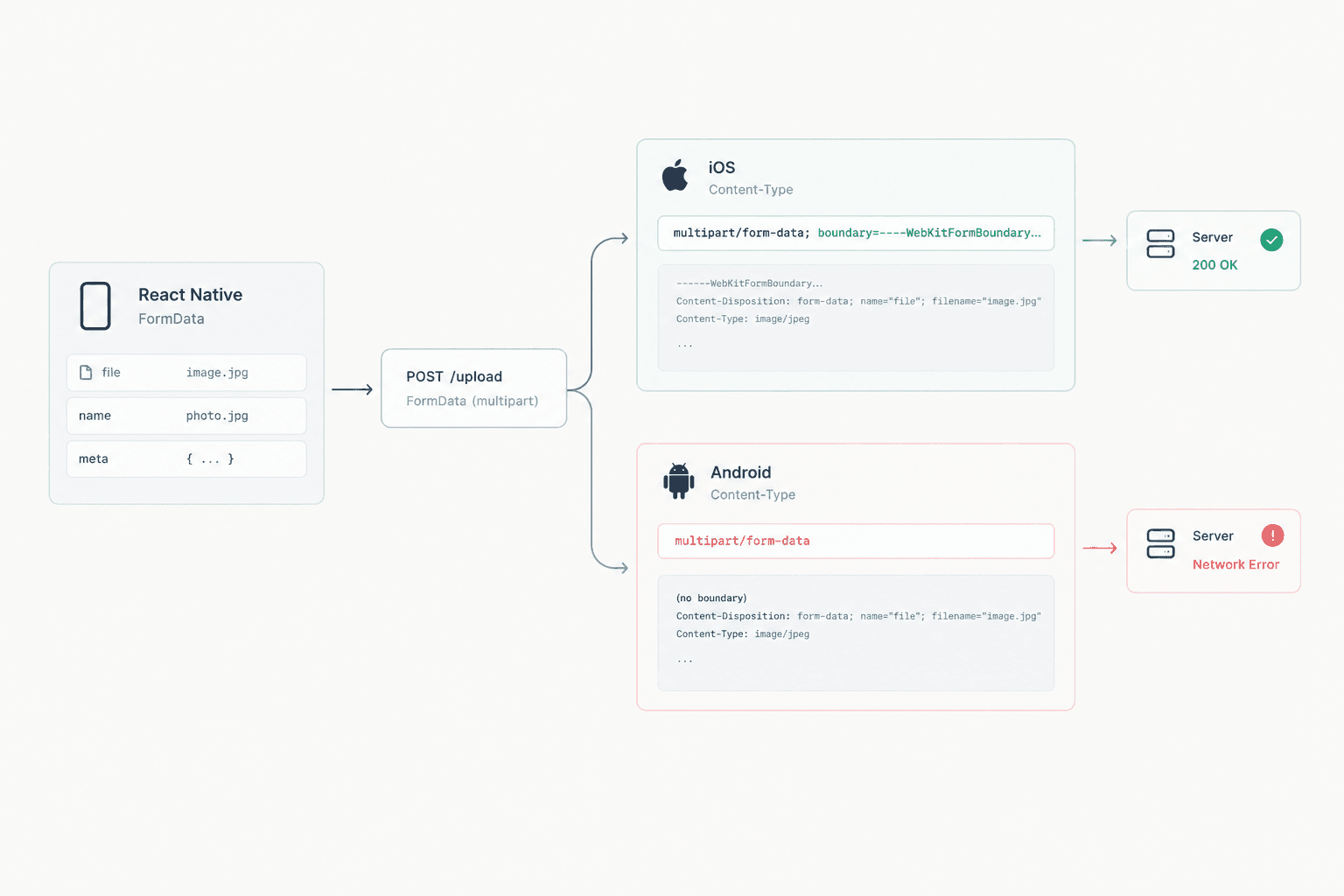
The Bug
You write an API call in React Native.
Everything works perfectly on iOS.
Then you test on Android and suddenly hit a wall — a vague Network Error with no useful stack trace. The request never even reaches the server.
Your logic is identical on both platforms. Nothing changed. So what’s going on?
This is one of the most common silent traps in React Native networking. The root cause lies in how Android and iOS handle FormData and Content-Type under the hood.
Why Android and iOS Behave Differently
React Native does not implement its own HTTP stack. Instead, it delegates networking to the native platform layer.
- On iOS → NSURLSession
- On Android → OkHttp
These two networking stacks behave differently when handling multipart requests.
When sending FormData, the HTTP specification requires a boundary string inside the Content-Type header.
The boundary is a unique delimiter used to separate fields in the request body.
Important detail:
This boundary should not be defined manually. It must be automatically generated by the HTTP layer when the request is constructed.
Here’s where the trap appears:
If you manually set
Content-Type: multipart/form-data
you are setting the header without a boundary.
- iOS (
NSURLSession) is forgiving. It detects theFormDatabody and automatically injects the missing boundary. - Android (
OkHttp) is strict. It trusts the header you provided and sends the request without a boundary.
The server cannot parse the multipart body.
The result?
A generic network error.
The Original Bug
// ❌ Buggy — manually setting Content-Type removes the boundary on Android
await HttpClient.post(url, formData, {
  headers: {
    "Content-Type": "multipart/form-data",
  },
});
This code works on iOS mostly by luck.
On Android, OkHttp receives a malformed multipart body because there is no boundary separator, and the request fails before it even reaches the server.
The Fix: Content-Type Negotiation Based on Payload
The correct approach is to inspect the contents of the FormData and choose the appropriate encoding strategy.
There are two possible scenarios.
Scenario 1 — The payload contains a file
If the payload includes a file (for example an image or document), you do need multipart/form-data.
However, do not manually set the Content-Type header. Let the native layer handle it so the boundary can be generated correctly.
Scenario 2 — The payload contains only text fields
If the request contains only text values, there is no need to use multipart encoding.
Instead, switch to application/x-www-form-urlencoded.
This encoding is simpler, lighter, and behaves consistently across both platforms.
// ✅ Detect whether the FormData contains a file
const hasFile = formData._parts.some(([key, value]) => {
  return value && typeof value === "object" && Boolean(value.uri || value.file || value.fileCopyUri);
});

if (hasFile) {
  // Let the native layer handle Content-Type
  await HttpClient.post(url, formData);
} else {
  // Convert to URL-encoded format for text-only data
  const params = new URLSearchParams();

  formData._parts.forEach(([key, value]) => {
    params.append(key, typeof value === "object" ? JSON.stringify(value) : String(value));
  });

  await HttpClient.post(url, params.toString(), {
    headers: {
      "Content-Type": "application/x-www-form-urlencoded",
    },
  });
}
One More Android Gotcha
When appending files to FormData on Android, always include the type field.
OkHttp relies on this value to determine the MIME type of the file.
Without it, the file part may be silently ignored.
// ❌ Works on iOS but unreliable on Android
formData.append("invoice", { uri: fileUri, name: "invoice.pdf" });

// ✅ Always include the MIME type
formData.append("invoice", {
  uri: fileUri,
  name: "invoice.pdf",
  type: "application/pdf",
});
Key Takeaways
- Never manually set
Content-Type: multipart/form-data. Let the native layer generate the boundary automatically. - If the payload contains only text fields, use
application/x-www-form-urlencodedinstead of multipart encoding. - When appending files on Android, always include
uri,name, andtype.
Useful Materials
- OkHttp Official Documentation
https://square.github.io/okhttp/ - MDN — multipart/form-data
https://developer.mozilla.org/en-US/docs/Web/HTTP/MIME_types#multipartform-data - MDN — application/x-www-form-urlencoded
https://developer.mozilla.org/en-US/docs/Web/HTTP/Methods/POST#url-encoded_form - React Native Networking Documentation
https://reactnative.dev/docs/network